
Saturday, April 11, 2009
Saturday, March 7, 2009
how to get static ip address
"Private" IP addresses usually begin with 192.168** and must be on the same "subnet" that the router is on, in other words, 192.168.1.something, and NOT 192.168.4.something. Only the last number will be different from the address of your router which by default (at least for Voyager routers), lives at 192.168.1.1. 192.168.0.1 is also common.
If your router has USB, it has probably already grabbed 192.168.1.2 for the USB connexion, so that leaves you with any number between 192.168.1.3 and 192.168.1.255 to use for your private computers to use as static IP's, one unique number per machine.
Remember to disable dhcp in your router before you start assigning static IP's.
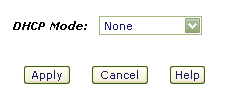

Alternatively, create a new dhcp range somewhere away from your regular static IP's, handy for guests and what-not, perhaps 192.168.1.50 - 192.168.1.99
Fortunately, assigning a static IP is very easy to achieve, and the same principle applies to every computing platform, the only real difference being where to apply the settings. I'll start with the trickiest..
*phew*
In other words, open the control panel, open Network Connections, right-click the "Local Area Connection" (unless you've renamed it to something else) and chose "Properties", then (in the "general" tab) select "Internet Protocol(TCP/IP)" and click the "Properties" button. Check the "Use the Following IP address" checkbox and enter your desired IP address. If you use 192.168.1.3 as your IP address, the dialog will look something like this..
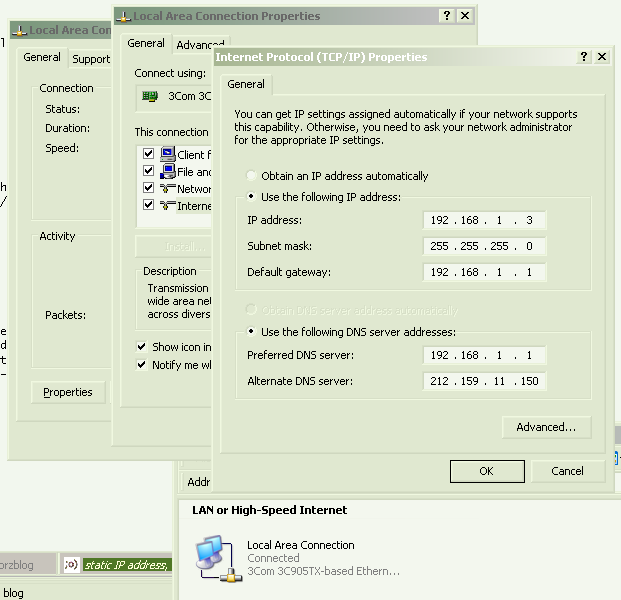
..which is a clever screencap, showing you just how to get there. When you're done, okay everything to close all the dialogs. It's smart to use 192.168.1.3 as your address, especially if you plan to use any of the ready-made script kicking around here.
I you are plugging your computers into a network switch (Good Idea!), it's also smart to plug each machine into its corresponding CAT-5 socket, router (192.168.1.1) into the first, 192.168.1.3 into the third, and so on.
** There are other private ranges, too, but most people don't need to know about those, 192.168.1.something is what most folk use, and though thousands of millions of machines in the world have 192.168.1.something as their private IP address, they don't interfere with each other because they are behind NATs and other gateways; from the outside, we only see the public IP address, aka. "external IP".
HOWEVER, if your router uses 192.168.0.something, or 10.0.0.something, or something else from the private IP ranges..
10.0.0.0 - 10.255.255.255
172.16.0.0 - 172.31.255.255
192.168.0.0 - 192.168.255.255
..then don't hesitate to use THAT instead of the 192.168.1.something addresses I use in my examples, that's what most routers use, but not all. Do check.
The best way to know what subnet your router uses, and thereby which IP to use, is to look and see what IP it has currently assigned to your computer. In Windows, it's in the Support tab of the connexion's Status dialog. A netstat command will get you the same information (and more) on most platforms, perhaps netstat -n. Your router's web interface will likely have all this information, too.
Remember to disable dhcp in your router before you start assigning static IP's.
Alternatively, create a new dhcp range somewhere away from your regular static IP's, handy for guests and what-not, perhaps 192.168.1.50 - 192.168.1.99
Fortunately, assigning a static IP is very easy to achieve, and the same principle applies to every computing platform, the only real difference being where to apply the settings. I'll start with the trickiest..
Windows®..
The dialog you are looking for is here..Control Panel >> Network Connections >> Local Area Connection >> Properties >> TCP/IP >> Properties
*phew*
In other words, open the control panel, open Network Connections, right-click the "Local Area Connection" (unless you've renamed it to something else) and chose "Properties", then (in the "general" tab) select "Internet Protocol(TCP/IP)" and click the "Properties" button. Check the "Use the Following IP address" checkbox and enter your desired IP address. If you use 192.168.1.3 as your IP address, the dialog will look something like this..
..which is a clever screencap, showing you just how to get there. When you're done, okay everything to close all the dialogs. It's smart to use 192.168.1.3 as your address, especially if you plan to use any of the ready-made script kicking around here.
I you are plugging your computers into a network switch (Good Idea!), it's also smart to plug each machine into its corresponding CAT-5 socket, router (192.168.1.1) into the first, 192.168.1.3 into the third, and so on.
Saturday, January 10, 2009
America
Actually, I really like South America. I have been to Costa Rica (central America actually) and Ecuador and I am planning my next trip to Peru. There are places in South American that are beautiful beyond belief. San Gerardo de Dota about 50 miles south of San Jose is one such place--eternal spring there. Only problem is that the nearest gas station is 30 miles away. Oh well we can't have everything. Ecuador has equally beautiful areas. While gasoline here was $4.00 a gallon, there it was $1.00 a gallon, but you really do not require a car in Ecuador. Both taxis and buses are inexpensive beyond belief. You like the beach? They have it. You like the mountains? Boy oh boy, do they have mountains!!! Think you might like to spend a little time in the jungle with the fer de lance snake and panthers? They have all three. And the best part of all over 1600 different birds.
The people are very friendly but they do have an attachment to others' belongings. Anyway, some do.
The cost of living in both countries is about 1/2 to 1/3 of that in the U S.
Would I like to live there? Not particularly, be I did meet a lot of Americans who are living in both countries. One I met purchased a farm in the mountains about an hour north of Quito and returned it to natural habitat. No electricity though. He has hummingbird feeders all over his back yard and for $5 tourists come sit on his porch, watch the birds, drink coffee, and eat cookies. Not a bad life at all.
EARN MONEY THROUGH SMS
The people are very friendly but they do have an attachment to others' belongings. Anyway, some do.
The cost of living in both countries is about 1/2 to 1/3 of that in the U S.
Would I like to live there? Not particularly, be I did meet a lot of Americans who are living in both countries. One I met purchased a farm in the mountains about an hour north of Quito and returned it to natural habitat. No electricity though. He has hummingbird feeders all over his back yard and for $5 tourists come sit on his porch, watch the birds, drink coffee, and eat cookies. Not a bad life at all.
EARN MONEY THROUGH SMS
Subscribe to:
Posts (Atom)


